


In recent years, there’s been increasing interest in home-grown messaging platforms in India, fueled by concerns over data privacy, foreign dependence, and a growing Swadeshi digital mindset. Arattai, a messaging and calling app created by Zoho Corporation in Chennai, comes into this picture.
Arattai has the tagline Made in India, Made for the world, and its mission is to enter the market against well-established giants such as WhatsApp and Telegram and deliver simplicity, security, and use across devices. This is a little in-depth exploration where we are going to look at what Arattai is, what the real users think about it, its strengths and weaknesses, and whether it is worth your time.
What is Arattai?

Arattai (a Tamil word meaning “casual chat” or “chit-chat”) is Zoho’s instant messaging solution. It is made based on their 10 years of experience working on collaboration tools and offers:
- Text messages, voice messages, audio and video calls.
- Document sharing (photos, files, etc.).
- Broadcasting to larger audiences (24-hour posts and Channels).
- Group chats supporting up to 1,000 members.
- Multi-device sync: Arattai can be used on five devices, on phones, tablets, desktops. All messages, contacts and settings are synced.
Arattai’s Core features & Usability
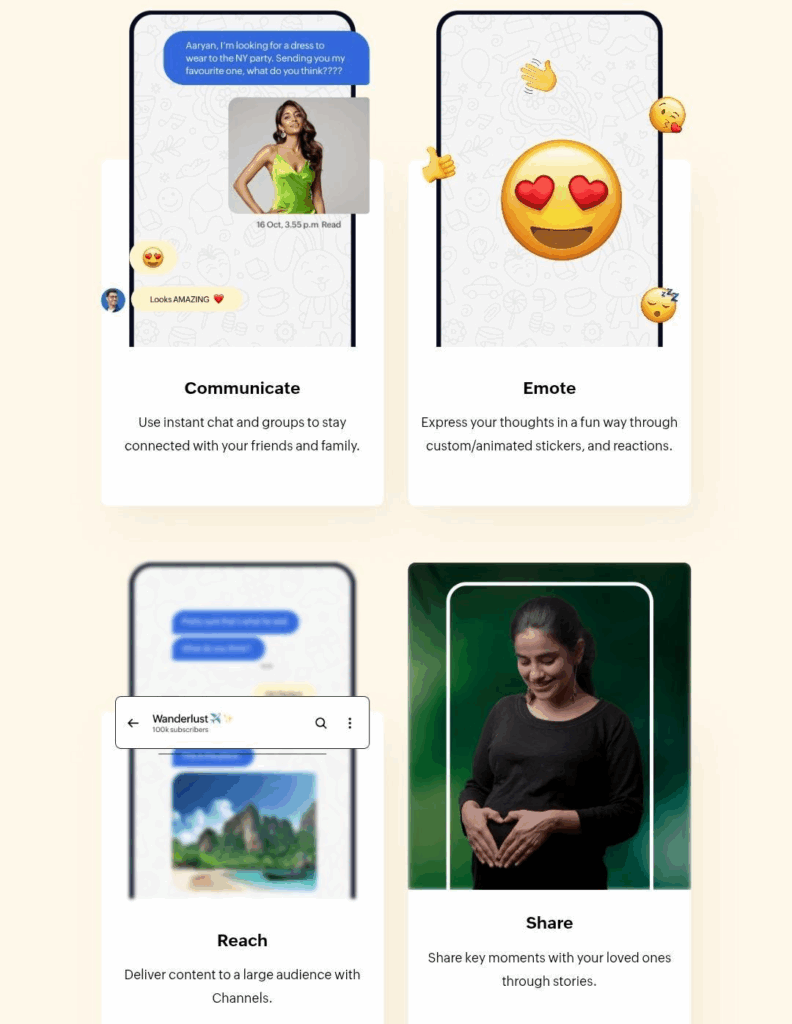
The following are the specific attributes that make Arattai Messaging App stand out, and where it still has some ability to expand.
1. Messaging, media & group features
- Rich media sharing: It supports the sharing of images, documents, videos and other file types.
- Response to messages: It is possible to leave emoji reactions to messages in one-on-one chats and groups, as well as channels. When you tap twice on a message, a default prompt action (thumbs up, and so on) appears. You can change your quick reaction in settings.
- Groups and channels: Big group support (up to 1000 people) assists in community building, families, and organisations. Channel owners/admins can configure: permissions for reactions, who can post, whether admin names are visible, etc..
- Stories & Channels: To broadcast updates, there are stories (which appear visible for 24 hrs) that provide a social aspect to the experience instead of direct chat. Channels permit one-to-many and many-to-many speaking (admins/owners) to large audiences.
2. Privacy, security & compliance
- Encrypted voice and video calls: According to Arattai, calls are encrypted using end-to-end encryption (E2EE). That means even Zoho cannot listen in.
- Messages not yet fully end-to-end encrypted: As disclosed by the privacy policy and commentary on the web, text/chat messages now lack full E2EE. Zoho says this is a planned feature.
- Data stored in India: Servers are local, and data is never given to a third party without consent. Profile, contacts ( optional ), usage, and device information are gathered, but Zoho claims strong protections.
- Certifications: Zoho and Arattai are both ISO/IEC 27001 certified on information security, as well as ISO/IEC 27701 on privacy information management.
3. Experience & performance
- Low-end device / weak network support: Zoho claims that Arattai is compatible with low-end smartphones and slow/unreliable internet networks. This plays a significant role in most Indian contexts.
- Feature polish: Features like disappearing messages (30 minutes) exist. There is also a screen security option that does not allow previewing the content of apps in the recent app switcher on Android.
- Interface & ease of use: According to social media posts and early reviews, Arattai is slick, intuitive, and familiar, like WhatsApp, so the transition process is easier.
Real user experience – what reviewers say
Arattai Messaging App has received a phenomenal rating of 4.9 stars in more than 22,000 reviews on Google Play, with Android users demonstrating a high level of acceptance.
IOS users also rate the app well on the Apple App Store, albeit with a lower install base than Android. The feedback there follows a similar pattern: most users are happy with performance and usability.
Common praise
- The clean interface and the smoothness and responsiveness of the app are mentioned in many reviews. Users frequently commend the app, noting that it provides a familiar, clutter-free experience, often drawing favourable comparisons to its larger rivals.
- The multi-device sync is another positive note. The reviewers mention that it functions well when switching between phone and desktop, and calls are always clear and steady.
Common requests and concerns
- Some of the users have requested enhanced message encryption. Although the calls are already end-to-end encrypted, reviewers would like the same transparency and security applied to the chats.
- Other Android reviewers report the minor hiccups in the UI, like the inability to access a gallery when selecting profile pictures. These do not disrupt the experience but indicate where polish is yet to be done.
- Some also mention the app name and icon and state that they do not find it as modern and catchy as international rivals.
How to get started with Arattai Messaging App
If you’re curious and want to try it, here’s how to make the most of it:
1. Download & install
- Android: through the Google Play Store.
- iOS: via Apple App Store.
2. Permissions
- Grant access to contacts (not a mandatory feature, most effective at finding out who is already using the app).
- Grant microphone and camera access in case you desire calls/videos.
- Permit storage/media access to file/photo sharing.
3. Set up multi-device
- You can make your phone and tablet/desktop devices synchronous, meaning that you can use the same phone and the same settings, chat history, and contacts everywhere.
4. Check privacy settings
- Pick who your stories are seen by, who can comment, and turn off anything that you don’t like. Take advantage of disappearing messages.
5. Explore Channels and Groups
- Join public channels of interest; create private ones if needed. Use group settings/admin controls to moderate.
6. Provide feedback
- Since the app is at its earliest stage, user feedback helps. Report issues, suggest features; Zoho seems responsive in early reviews.
Conclusion
Arattai is not a mere messaging application; it symbolises something bigger: a local tech drive, privacy, and reasonable options in the market controlled by a handful of giants. It already has high ratings in numerous aspects: Multi-device syncing, group and channel, local data storage, and performance with modest hardware.
But it’s not perfect yet. For full trust among privacy-centric users, end-to-end encryption for all messages is essential. And for widespread adoption, the network effect needs to kick in: more people using it means more usefulness. Keep an eye on its updates and roadmap. It could evolve into a serious competitor.